Android System Hardening Chronicles: In Search of a Configuration Resilient to Targeted Attacks
Last content update: 2026-09-21
This material is a direct supplement to the main article:
"System Hardening Chronicles: Seeking a Configuration Resilient to Targeted Attacks".
It describes the experience with Android mobile devices, which confirms and expands upon the conclusions drawn for desktop systems.
Last updated: 2026-09-21
📋 TL;DR — Table of Contents
- What this article is about: A supplement to the main system hardening article. Describes targeted attacks on Android devices (ZTE Blade A522 and Lenovo TB-8504X), confirming that the standard factory configuration of Android does not provide resilience against professional targeted attacks.
1. Introduction: Android as a Target of Targeted Attacks
1.1 Context
The attacking party is the same as in the main article: presumably a group with at least 20 years of experience in targeted attacks, possessing both technological and socio-technical methods.
This section documents an incident involving a mobile device that occurred before the start of systematic hardening of the desktop system. Nevertheless, the nature of the breach and the level of access gained by the attacker fully correspond to the attack model described in the main document.
1.2 The Role of Mobile Devices in the Attack
The analysis suggests that a compromised Android smartphone (tablet) can be used by the attacker as:
- a means of persistent audio and video surveillance;
- a channel for traffic leakage (including encrypted data before transmission);
- a data collection point from Google accounts and other services.
At the same time, the standard factory configuration of Android (even with up-to-date security patches) does not provide resilience against a targeted adversary.
📋 TL;DR — Introduction
- Key points: The attacking group has ≥20 years of experience. A compromised Android device can be used for audio/video surveillance, traffic leakage, and data collection. The standard factory configuration of Android does not provide resilience against targeted attacks.
2. Description of Device 1 (Smartphone)
2.1. Description of Device 1 (Initial Configuration)
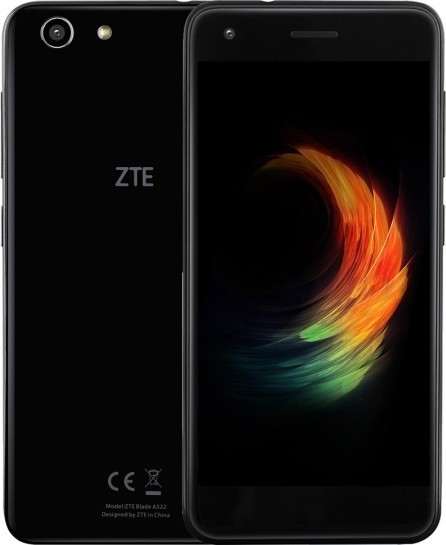
2.1.1 Device Specifications
| Parameter | Value | |-----------|-------| | Model | ZTE Blade A522 | | Purchase Date | April 2019 | | Condition at Purchase | New device, receiving security updates | | Android Version | 7.1.1 | | Kernel Version | 3.18.31-perf | | Baseband Version | P817E53B01 | | Build Number | GEN_CIS_A511_V1.0 |2.1.2. Software Environment and Network Settings
- Security Software: None installed.
- Application Sources: Official Google Play only.
- Google Account: Connected.
- SIM Card: Installed.
- Internet Access: Mobile network + Wi-Fi (router under user's control).
2.1.3. User Actions
The device was used as a primary smartphone without any additional security measures (bootloader lock, custom firmware, firewall, system-level permission control, etc.).
2.2. Detected Compromise
2.2.1. Date of Detection
April 2020 (approximately 12 months after initial use).
2.2.2. Capabilities Gained by the Attacker
As a result of remote access (without physical contact with the device), the attacker gained the following capabilities:
- Audio Espionage
- Real-time interception of all phone calls.
- Persistent background activation of the microphone, even when no active call is in progress or the system dialer app is not running.
- Recording of ambient sound near the smartphone at any time.
- Video Espionage
Full remote access to both front and rear cameras — the ability to view the video stream from any camera at any moment. - Network Traffic Interception
Complete capability to read all internet traffic from the device (including traffic from applications using HTTPS, either before application-level encryption or after decryption).
2.2.3. Commentary
The achieved level of access indicates the exploitation of one or more zero-day vulnerabilities in the kernel (3.18.31-perf), baseband firmware, or Android 7.1.1 components that were not closed by security updates. The level of control gained is equivalent to a full remote rootkit.
2.3. Status and Limitations of Further Investigation
⚠️ Physical Damage to the Device
Subsequently, the smartphone suffered physical damage, making further forensic investigation (firmware dumping, log analysis, identification of the attack vector and traces of the attacker's presence) impossible.
Thus, the exact method of intrusion and the exploited vulnerabilities remain unidentified. However, the very fact of gaining such extensive capabilities in the absence of any protective measures fully confirms the thesis of the main article:
The standard (factory) configuration of any device, whether desktop Linux or Android, is not resilient against a targeted attack by a professional group.
📋 TL;DR — Device 1 (Smartphone)
- ZTE Blade A522 (Android 7.1.1): Attack detected in April 2020. Full remote control gained: audio/video espionage, traffic interception. Zero-day vulnerabilities. Device damaged, exact attack method unidentified.
3. Device 2 (Tablet)
3.1. Description of Device 2 (Tablet)
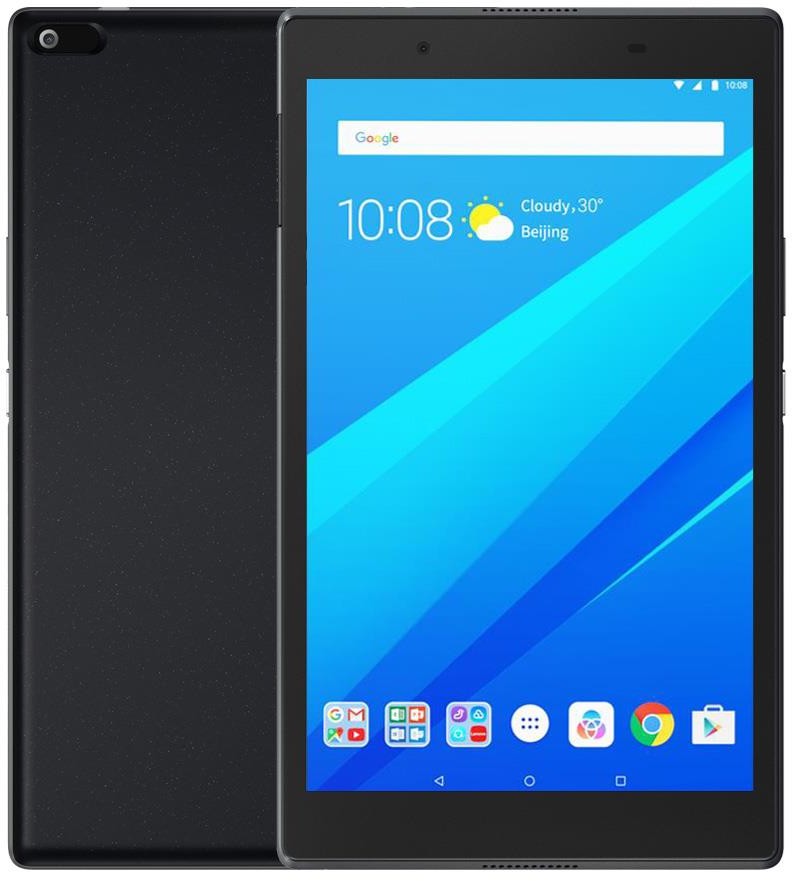
3.1.1. Device Specifications
| Parameter | Value | |-----------|-------| | Model | Lenovo TB-8504X | | Purchase Date | April 2019 (simultaneously with ZTE Blade A522 smartphone) | | Android Version | 8.1.0 | | Software Version | TB-8504X_RF01_170520 | | Build Number | TB-8504X_S001031_191204_ROW | | Kernel Version | 3.18.71 | | Baseband Version | S.JO.3.0-00448-8937_GENNS_PACK-1 | | Last Security Update | November 5, 2019 |3.1.2. Initial State and Attack Detection
At the time of purchase, the tablet was in a new configuration and received security updates (the last being November 2019). No security measures (firewalls, antivirus software, permission controls) were installed.
The hacker attack was detected in April 2020 — simultaneously with the compromise of the ZTE Blade A522 smartphone.
3.1.3. Applied Security Measures (Current Configuration)
(Between 2021 and 2024, the device was not used, remained powered off, and was periodically charged to 90% battery. Investigation of the device hacking issue began in March 2025.)
- NetGuard — application-level firewall (no root required).
- Always-on VPN for NetGuard — enabled (local VPN service for traffic filtering).
- Block connections without VPN — disabled.
- When this parameter was enabled, internet connectivity was completely absent, including for applications whitelisted in NetGuard.
- Network Access Permissions:
- All system applications visible to NetGuard have internet access denied (190 applications blocked).
- Only 6 applications are allowed:
- VpnDialogs (required for NetGuard operation)
- Aurora Store (alternative Google Play client)
- F-Droid (free software repository)
- LibreTube (video streaming client)
- Via (fast browser)
- Shelter (application isolation — disabled, rarely enabled)
- Google Account: Not added (previous account removed).
- SIM Card: Installed, but no mobile data plan is active. The tablet uses only Wi-Fi.
- Network Environment: The device does not leave the home premises (within Wi-Fi router range), connecting only through a trusted home network.
3.2. Current Attacker Capabilities (With NetGuard Configuration)
Despite the applied measures, the hacker retains the following capabilities:
- Reading text files created and saved in the QuickEdit editor.
- Reading AI conversations (ChatGPT, DeepSeek) in the authorized web version of the interface in the Fennec browser.
- Reading messages in Lumia application chats.
3.3. Changes After Installing NetGuard
- Before installing NetGuard, the attacker had the ability to remotely access the microphone and camera.
- After installing NetGuard, there is no data indicating access to the camera or microphone.
Presumably, NetGuard blocked the network ports or services used for capturing multimedia streams; however, vulnerabilities that allow reading files and intercepting chat text remain unaddressed.
3.4. Research Status and Priorities
⚠️ Time Constraints and Priorities
Due to limited available time, the priority remains the investigation of the attack on the primary personal computer. Analysis of the attack on the tablet is of secondary importance.
Monitoring of hacker activity targeting the tablet continues. Upon obtaining new data, the configuration will be reviewed and security measures strengthened.
Last data update: April 23, 2026
3.5. Tablet - Configuration 2
Section created: 2026-06-29
Changes:
- Shelter removed — significantly slowed down the already outdated device. No positive security effect from using Shelter was identified.
- Google account added — no impact on device security was detected regarding the presence or absence of a Google account. Browser activity data (my conversations with DeepSeek, YouTube viewing) remains accessible to the attacker regardless.
Uncertain data:
- Unknown whether the attacker has access to the file system.
<?xml version='1.0' encoding='UTF-8' standalone='yes' ?>
<netguard>
  <!-- ========================================== -->
  <!-- ГРУППА 1: Wi-Fi ЗАБЛОКИРОВАН, Мобильный ЗАБЛОКИРОВАН -->
  <!-- (whitelist = false, value="true" = ЗАБЛОКИРОВАНО) -->
  <!-- ========================================== -->
  <!-- 187 ЗАБЛОКИРОВАННЫХ СИСТЕМНЫХ ПРИЛОЖЕНИЙ: -->
  <wifi>
    <setting key="com.lenovo.ota" type="boolean" value="true" />
    <setting key="com.android.storagemanager" type="boolean" value="true" />
    <setting key="com.lenovo.csdkplatform" type="boolean" value="true" />
    <setting key="com.android.printspooler" type="boolean" value="true" />
    <setting key="com.qualcomm.svi" type="boolean" value="true" />
    <setting key="com.qti.service.colorservice" type="boolean" value="true" />
    <setting key="com.longcheertel.midtest" type="boolean" value="true" />
    <setting key="com.android.defcontainer" type="boolean" value="true" />
    <setting key="org.codeaurora.btmultisim" type="boolean" value="true" />
    <setting key="com.qualcomm.qti.poweroffalarm" type="boolean" value="true" />
    <setting key="android.media" type="boolean" value="true" />
    <setting key="com.qualcomm.qti.StatsPollManager" type="boolean" value="true" />
    <setting key="com.qualcomm.qti.simsettings" type="boolean" value="true" />
    <setting key="org.videolan.vlc" type="boolean" value="true" />
    <setting key="com.android.pacprocessor" type="boolean" value="true" />
    <setting key="com.google.android.packageinstaller" type="boolean" value="true" />
    <setting key="com.rhmsoft.edit" type="boolean" value="true" />
    <setting key="com.qualcomm.qti.phonefeature" type="boolean" value="true" />
    <setting key="com.wapi.wapicertmanage" type="boolean" value="true" />
    <setting key="com.lenovo.tab4_8" type="boolean" value="true" />
    <setting key="com.rarlab.rar" type="boolean" value="true" />
    <setting key="com.qualcomm.cabl" type="boolean" value="true" />
    <setting key="com.tblenovo.soundrecorder" type="boolean" value="true" />
    <setting key="com.android.wallpaper.livepicker" type="boolean" value="true" />
    <setting key="nobody" type="boolean" value="true" />
    <setting key="com.android.providers.telephony" type="boolean" value="true" />
    <setting key="com.android.contacts" type="boolean" value="true" />
    <setting key="com.google.android.partnersetup" type="boolean" value="true" />
    <setting key="com.google.android.talk" type="boolean" value="true" />
    <setting key="com.qualcomm.qti.networksetting" type="boolean" value="true" />
    <setting key="com.android.deskclock" type="boolean" value="true" />
    <setting key="com.dti.lenovo.tablet" type="boolean" value="true" />
    <setting key="com.google.android.tts" type="boolean" value="true" />
    <setting key="com.android.dreams.phototable" type="boolean" value="true" />
    <setting key="com.lenovo.lps.cloud.sync.row" type="boolean" value="true" />
    <setting key="com.qualcomm.qti.qcom_accesslogkit" type="boolean" value="true" />
    <setting key="com.google.android.ext.shared" type="boolean" value="true" />
    <setting key="com.android.cts.ctsshim" type="boolean" value="true" />
    <setting key="com.google.android.apps.photos" type="boolean" value="true" />
    <setting key="com.android.providers.contacts" type="boolean" value="true" />
    <setting key="com.lenovo.ue.device" type="boolean" value="true" />
    <setting key="com.android.sharedstoragebackup" type="boolean" value="true" />
    <setting key="com.android.mtp" type="boolean" value="true" />
    <setting key="com.android.documentsui" type="boolean" value="true" />
    <setting key="com.tblenovo.setup" type="boolean" value="true" />
    <setting key="com.android.bookmarkprovider" type="boolean" value="true" />
    <setting key="com.lenovo.weather.theme.dreamlandPad" type="boolean" value="true" />
    <setting key="com.google.android.gsf" type="boolean" value="true" />
    <setting key="com.google.android.apps.maps" type="boolean" value="true" />
    <setting key="com.qualcomm.qti.autoregistration" type="boolean" value="true" />
    <setting key="com.google.android.apps.tachyon" type="boolean" value="true" />
    <setting key="com.android.emergency" type="boolean" value="true" />
    <setting key="com.google.android.ims" type="boolean" value="true" />
    <setting key="com.qualcomm.simcontacts" type="boolean" value="true" />
    <setting key="com.android.carrierdefaultapp" type="boolean" value="true" />
    <setting key="com.qualcomm.qti.auth.fidocryptoservice" type="boolean" value="true" />
    <setting key="com.android.location.fused" type="boolean" value="true" />
    <setting key="com.android.cellbroadcastreceiver" type="boolean" value="true" />
    <setting key="com.lenovo.launcher" type="boolean" value="true" />
    <setting key="com.google.android.googlequicksearchbox" type="boolean" value="true" />
    <setting key="com.android.statementservice" type="boolean" value="true" />
    <setting key="com.android.providers.settings" type="boolean" value="true" />
    <setting key="com.android.systemui.theme.dark" type="boolean" value="true" />
    <setting key="com.qti.qualcomm.datastatusnotification" type="boolean" value="true" />
    <setting key="com.android.systemui" type="boolean" value="true" />
    <setting key="com.dsi.ant.server" type="boolean" value="true" />
    <setting key="org.codeaurora.ims" type="boolean" value="true" />
    <setting key="com.android.bips" type="boolean" value="true" />
    <setting key="com.qualcomm.location" type="boolean" value="true" />
    <setting key="com.android.companiondevicemanager" type="boolean" value="true" />
    <setting key="com.android.dreams.basic" type="boolean" value="true" />
    <setting key="android.gps" type="boolean" value="true" />
    <setting key="com.codeaurora.fmradio" type="boolean" value="true" />
    <setting key="com.qualcomm.qcrilmsgtunnel" type="boolean" value="true" />
    <setting key="com.lenovo.dsa" type="boolean" value="true" />
    <setting key="com.chaozhuo.filemanager" type="boolean" value="true" />
    <setting key="com.qualcomm.qti.appnetaccess" type="boolean" value="true" />
    <setting key="com.android.mms" type="boolean" value="true" />
    <setting key="com.kidoz.lenovo" type="boolean" value="true" />
    <setting key="com.android.shell" type="boolean" value="true" />
    <setting key="com.qualcomm.embms" type="boolean" value="true" />
    <setting key="com.qti.xdivert" type="boolean" value="true" />
    <setting key="com.android.backupconfirm" type="boolean" value="true" />
    <setting key="com.google.android.onetimeinitializer" type="boolean" value="true" />
    <setting key="com.qualcomm.timeservice" type="boolean" value="true" />
    <setting key="com.android.settings" type="boolean" value="true" />
    <setting key="com.android.providers.userdictionary" type="boolean" value="true" />
    <setting key="com.google.android.feedback" type="boolean" value="true" />
    <setting key="com.qualcomm.qti.ims" type="boolean" value="true" />
    <setting key="com.lenovo.lsf" type="boolean" value="true" />
    <setting key="com.qualcomm.qti.telephonyservice" type="boolean" value="true" />
    <setting key="com.qualcomm.qti.confdialer" type="boolean" value="true" />
    <setting key="com.android.wantjoin.settings" type="boolean" value="true" />
    <setting key="com.qti.dpmserviceapp" type="boolean" value="true" />
    <setting key="com.google.android.setupwizard" type="boolean" value="true" />
    <setting key="com.android.bluetoothmidiservice" type="boolean" value="true" />
    <setting key="com.qualcomm.wfd.service" type="boolean" value="true" />
    <setting key="com.android.carrierconfig" type="boolean" value="true" />
    <setting key="com.android.dialer" type="boolean" value="true" />
    <setting key="com.google.android.webview" type="boolean" value="true" />
    <setting key="com.android.phone" type="boolean" value="true" />
    <setting key="com.goodix.test" type="boolean" value="true" />
    <setting key="com.android.mms.service" type="boolean" value="true" />
    <setting key="com.android.egg" type="boolean" value="true" />
    <setting key="com.android.captiveportallogin" type="boolean" value="true" />
    <setting key="com.google.android.printservice.recommendation" type="boolean" value="true" />
    <setting key="com.android.timerswitch" type="boolean" value="true" />
    <setting key="com.android.inputdevices" type="boolean" value="true" />
    <setting key="com.qualcomm.qti.accesscache" type="boolean" value="true" />
    <setting key="com.qualcomm.qti.auth.sampleauthenticatorservice" type="boolean" value="true" />
    <setting key="com.kunzisoft.keepass.libre" type="boolean" value="true" />
    <setting key="com.google.android.apps.work.oobconfig" type="boolean" value="true" />
    <setting key="com.android.calllogbackup" type="boolean" value="true" />
    <setting key="com.android.providers.partnerbookmarks" type="boolean" value="true" />
    <setting key="com.tblenovo.whatsnewclient" type="boolean" value="true" />
    <setting key="com.android.providers.calendar" type="boolean" value="true" />
    <setting key="com.google.android.tag" type="boolean" value="true" />
    <setting key="com.qti.confuridialer" type="boolean" value="true" />
    <setting key="com.lenovo.wallpaper" type="boolean" value="true" />
    <setting key="com.android.externalstorage" type="boolean" value="true" />
    <setting key="org.codeaurora.bluetooth" type="boolean" value="true" />
    <setting key="com.lenovo.agent0" type="boolean" value="true" />
    <setting key="com.qualcomm.qti.callfeaturessetting" type="boolean" value="true" />
    <setting key="com.android.server.telecom" type="boolean" value="true" />
    <setting key="com.android.vending" type="boolean" value="true" />
    <setting key="com.dolby.dax2appUI" type="boolean" value="true" />
    <setting key="com.android.keychain" type="boolean" value="true" />
    <setting key="com.android.wallpaperbackup" type="boolean" value="true" />
    <setting key="com.lenovo.lsf.device" type="boolean" value="true" />
    <setting key="com.android.chrome" type="boolean" value="true" />
    <setting key="com.android.managedprovisioning" type="boolean" value="true" />
    <setting key="com.android.stk" type="boolean" value="true" />
    <setting key="com.android.providers.media" type="boolean" value="true" />
    <setting key="com.qualcomm.qti.auth.sampleextauthservice" type="boolean" value="true" />
    <setting key="com.google.android.apps.docs" type="boolean" value="true" />
    <setting key="com.google.android.youtube" type="boolean" value="true" />
    <setting key="com.lenovo.ocpl" type="boolean" value="true" />
    <setting key="com.android.wallpapercropper" type="boolean" value="true" />
    <setting key="android" type="boolean" value="true" />
    <setting key="org.codeaurora.snapcam" type="boolean" value="true" />
    <setting key="com.skype.raider" type="boolean" value="true" />
    <setting key="com.google.android.gms" type="boolean" value="true" />
    <setting key="com.google.android.backuptransport" type="boolean" value="true" />
    <setting key="com.lenovo.launcher.provider" type="boolean" value="true" />
    <setting key="com.motorola.demo" type="boolean" value="true" />
    <setting key="com.google.android.videos" type="boolean" value="true" />
    <setting key="com.tblenovo.lewea" type="boolean" value="true" />
    <setting key="com.android.certinstaller" type="boolean" value="true" />
    <setting key="com.qualcomm.qti.auth.securesampleauthservice" type="boolean" value="true" />
    <setting key="com.qapp.secprotect" type="boolean" value="true" />
    <setting key="com.google.android.marvin.talkback" type="boolean" value="true" />
    <setting key="root" type="boolean" value="true" />
    <setting key="com.qualcomm.qti.qtisystemservice" type="boolean" value="true" />
    <setting key="com.android.proxyhandler" type="boolean" value="true" />
    <setting key="com.android.poweronalert" type="boolean" value="true" />
    <setting key="com.android.smspush" type="boolean" value="true" />
    <setting key="com.wantjoin.safeBrowser" type="boolean" value="true" />
    <setting key="com.android.providers.downloads" type="boolean" value="true" />
    <setting key="com.longcheertel.modemlog" type="boolean" value="true" />
    <setting key="com.qti.qualcomm.deviceinfo" type="boolean" value="true" />
    <setting key="com.android.wantjoin.childmode.ctrl" type="boolean" value="true" />
    <setting key="android.dns" type="boolean" value="true" />
    <setting key="com.google.android.ext.services" type="boolean" value="true" />
    <setting key="com.quicinc.cne.CNEService" type="boolean" value="true" />
    <setting key="com.lenovo.dagent" type="boolean" value="true" />
    <setting key="com.goodix.rawdata" type="boolean" value="true" />
    <setting key="com.android.bluetooth" type="boolean" value="true" />
    <setting key="app.olauncher" type="boolean" value="true" />
    <setting key="com.android.calculator2" type="boolean" value="true" />
    <setting key="com.android.cts.priv.ctsshim" type="boolean" value="true" />
    <setting key="com.qualcomm.qti.auth.secureextauthservice" type="boolean" value="true" />
    <setting key="com.qualcomm.qti.lpa" type="boolean" value="true" />
    <setting key="com.google.android.syncadapters.contacts" type="boolean" value="true" />
    <setting key="com.android.providers.downloads.ui" type="boolean" value="true" />
    <setting key="com.android.providers.blockednumber" type="boolean" value="true" />
    <setting key="com.qualcomm.qti.uceShimService" type="boolean" value="true" />
    <setting key="com.qualcomm.qti.uim" type="boolean" value="true" />
    <setting key="com.google.android.gm" type="boolean" value="true" />
    <setting key="android.multicast" type="boolean" value="true" />
    <setting key="com.qualcomm.qti.callenhancement" type="boolean" value="true" />
    <setting key="com.android.partnerbrowsercustomizations.example" type="boolean" value="true" />
    <setting key="com.google.android.inputmethod.latin" type="boolean" value="true" />
    <setting key="com.google.android.music" type="boolean" value="true" />
    <setting key="com.android.htmlviewer" type="boolean" value="true" />
    <setting key="com.google.android.configupdater" type="boolean" value="true" />
    <setting key="com.tblenovo.whatsnewhost" type="boolean" value="true" />
    <setting key="com.google.android.calendar" type="boolean" value="true" />
  </wifi>

  <!-- ========================================== -->
  <!-- ГРУППА 2: Wi-Fi РАЗРЕШЁН, Мобильный РАЗРЕШЁН -->
  <!-- (whitelist = false, НЕ УКАЗАНЫ в экспорте, но РАЗРЕШЕНЫ по скриншоту) -->
  <!-- ========================================== -->
  <!--
    7 разрешённых приложений (НЕ ВКЛЮЧЕНЫ в списки выше):
    1. com.aurora.store (Aurora Store)
    2. org.fdroid.fdroid (F-Droid)
    3. org.mozilla.fennec (Fennec)
    4. com.github.libretube (LibreTube)
    5. com.mediaget.android (MediaGet)
    6. mark.via (Via)
    7. com.android.vpndialogs (VpnDialogs)
  -->

  <!-- ========================================== -->
  <!-- ГРУППА 3: Wi-Fi ЗАБЛОКИРОВАН, Мобильный РАЗРЕШЁН -->
  <!-- ========================================== -->
  <!-- (нет таких приложений) -->

  <!-- ========================================== -->
  <!-- ГРУППА 4: Wi-Fi РАЗРЕШЁН, Мобильный ЗАБЛОКИРОВАН -->
  <!-- ========================================== -->
  <!-- (нет таких приложений) -->

  <!-- ========================================== -->
  <!-- ГЛОБАЛЬНЫЕ НАСТРОЙКИ -->
  <!-- ========================================== -->
  <application>
    <setting key="subnet" type="boolean" value="false" />
    <setting key="reload_onconnectivity" type="boolean" value="true" />
    <setting key="disable_on_call" type="boolean" value="false" />
    <setting key="filter_udp" type="boolean" value="true" />
    <setting key="dark_theme" type="boolean" value="true" />
    <setting key="whitelist_roaming" type="boolean" value="true" />
    <setting key="lockdown_other" type="boolean" value="true" />
    <setting key="lan" type="boolean" value="false" />
    <setting key="national_roaming" type="boolean" value="false" />
    <setting key="pcap_file_size" type="string" value="2" />
    <setting key="whitelist_other" type="boolean" value="false" />
    <setting key="unmetered_4g" type="boolean" value="false" />
    <setting key="hint_fairemail" type="boolean" value="false" />
    <setting key="hint_push" type="boolean" value="false" />
    <setting key="pcap_record_size" type="string" value="64" />
    <setting key="version" type="integer" value="2026052101" />
    <setting key="wifi_homes" type="set" value="" />
    <setting key="hosts_url" type="string" value="https://www.netguard.me/hosts" />
    <setting key="install" type="boolean" value="true" />
    <setting key="use_metered" type="boolean" value="false" />
    <setting key="nodoze" type="boolean" value="false" />
    <setting key="stats_frequency" type="string" value="1000" />
    <setting key="lockdown_wifi" type="boolean" value="true" />
    <setting key="eu_roaming" type="boolean" value="false" />
    <setting key="show_top" type="boolean" value="false" />
    <setting key="notify_access" type="boolean" value="false" />
    <setting key="log_app" type="boolean" value="false" />
    <setting key="show_stats" type="boolean" value="false" />
    <setting key="show_system" type="boolean" value="true" />
    <setting key="enabled" type="boolean" value="true" />
    <setting key="manage_system" type="boolean" value="true" />
    <setting key="stats_samples" type="string" value="90" />
    <setting key="hint_usage" type="boolean" value="false" />
    <setting key="screen_other" type="boolean" value="false" />
    <setting key="initialized" type="boolean" value="true" />
    <setting key="theme" type="string" value="teal" />
    <setting key="whitelist_wifi" type="boolean" value="false" />
    <setting key="unmetered_2g" type="boolean" value="false" />
    <setting key="use_hosts" type="boolean" value="true" />
    <setting key="handover" type="boolean" value="false" />
    <setting key="hint_system" type="boolean" value="false" />
    <setting key="screen_on" type="boolean" value="true" />
    <setting key="update_check" type="boolean" value="true" />
    <setting key="socks5_enabled" type="boolean" value="false" />
    <setting key="debug_iab" type="boolean" value="false" />
    <setting key="ip6" type="boolean" value="true" />
    <setting key="filter" type="boolean" value="false" />
    <setting key="auto_enable" type="string" value="0" />
    <setting key="screen_delay" type="string" value="0" />
    <setting key="watchdog" type="string" value="0" />
    <setting key="hint_whitelist" type="boolean" value="false" />
    <setting key="loglevel" type="string" value="6" />
    <setting key="screen_wifi" type="boolean" value="false" />
    <setting key="tethering" type="boolean" value="false" />
    <setting key="track_usage" type="boolean" value="false" />
    <setting key="unmetered_3g" type="boolean" value="false" />
  </application>
  <screen_wifi />
  <screen_other />
  <roaming />
  <lockdown />
  <apply />
  <notify />
  <filter />
  <forward />
</netguard>
3.6. Tablet - Configuration 3
Section created: 2026-07-29
Changes:
- Factory reset performed.
- NetGuard removed and replaced with RethinkDNS — a fully-featured open-source solution with no free version limitations.
Identified issue:
- Gmail is not functioning. When attempting to sync, the following error appears: "The Gmail app is trying to use an unavailable Google Play service. Please try again later." Google Play, however, has network access under the current configuration and installs applications correctly. The cause requires separate investigation.
Status: configuration is currently in testing phase and is not final. Plans include transitioning more applications to isolated (Isolate) mode with access restricted via whitelisting of ports, domains, and IP addresses.
==========================================
RETHINKDNS CONFIGURATION (POST-RESET)
==========================================

==========================================
GLOBAL MODE: BLOCK ALL BY DEFAULT
==========================================
All applications are blocked except those explicitly allowed.
Exceptions (not blocked, but not isolated):
ChatGPT, DeepSeek, Gmail, Google Play, Google Service Framework,
Google Backup, Lumia, Google Play Services

==========================================
ALLOWED APPLICATIONS (UNRESTRICTED ACCESS)
==========================================
1. F-Droid (org.fdroid.fdroid)
2. Google One Time Init (com.google.android.onetimeinitializer)
3. LocalSend (org.localsend.localsend_app)
4. VpnDialogs (com.android.vpndialogs)
5. RethinkDNS

==========================================
ISOLATED APPLICATIONS (ACCESS ONLY BY WHITELIST)
==========================================

---------- Chrome ----------
Domain rules:
*.gstatic.com
*.google.com
*.dreamwidth.org
IP and port rules:
0:0:0:0:0:0:0:0 : 80
0:0:0:0:0:0:0:0 : 443

---------- Proton Pass ----------
Domain rules:
*.proton.me
IP and port rules:
0:0:0:0:0:0:0:0 : 80
0:0:0:0:0:0:0:0 : 443

---------- YouTube ----------
Domain rules:
*.youtube.com
*.google.com
*.googlevideo.com
*.googleapis.com
*.ytimg.com
*.ggpht.com
IP and port rules:
0:0:0:0:0:0:0:0 : 80
0:0:0:0:0:0:0:0 : 443

==========================================
BLOCKED APPLICATIONS (177)
==========================================

com.lenovo.ota
com.android.storagemanager
com.lenovo.csdkplatform
com.android.printspooler
com.qualcomm.svi
com.qti.service.colorservice
com.longcheertel.midtest
com.android.defcontainer
org.codeaurora.btmultisim
com.qualcomm.qti.poweroffalarm
android.media
com.qualcomm.qti.StatsPollManager
com.qualcomm.qti.simsettings
org.videolan.vlc
com.android.pacprocessor
com.google.android.packageinstaller
com.rhmsoft.edit
com.qualcomm.qti.phonefeature
com.wapi.wapicertmanage
com.lenovo.tab4_8
com.rarlab.rar
com.qualcomm.cabl
com.tblenovo.soundrecorder
com.android.wallpaper.livepicker
nobody
com.android.providers.telephony
com.android.contacts
com.google.android.partnersetup
com.google.android.talk
com.qualcomm.qti.networksetting
com.android.deskclock
com.dti.lenovo.tablet
com.google.android.tts
com.android.dreams.phototable
com.lenovo.lps.cloud.sync.row
com.qualcomm.qti.qcom_accesslogkit
com.google.android.ext.shared
com.android.cts.ctsshim
com.google.android.apps.photos
com.android.providers.contacts
com.lenovo.ue.device
com.android.sharedstoragebackup
com.android.mtp
com.android.documentsui
com.tblenovo.setup
com.android.bookmarkprovider
com.lenovo.weather.theme.dreamlandPad
com.google.android.gsf
com.google.android.apps.maps
com.qualcomm.qti.autoregistration
com.google.android.apps.tachyon
com.android.emergency
com.google.android.ims
com.qualcomm.simcontacts
com.android.carrierdefaultapp
com.qualcomm.qti.auth.fidocryptoservice
com.android.location.fused
com.android.cellbroadcastreceiver
com.lenovo.launcher
com.google.android.googlequicksearchbox
com.android.statementservice
com.android.providers.settings
com.android.systemui.theme.dark
com.qti.qualcomm.datastatusnotification
com.android.systemui
com.dsi.ant.server
org.codeaurora.ims
com.android.bips
com.qualcomm.location
com.android.companiondevicemanager
com.android.dreams.basic
android.gps
com.codeaurora.fmradio
com.qualcomm.qcrilmsgtunnel
com.lenovo.dsa
com.chaozhuo.filemanager
com.qualcomm.qti.appnetaccess
com.android.mms
com.kidoz.lenovo
com.android.shell
com.qualcomm.embms
com.qti.xdivert
com.android.backupconfirm
com.qualcomm.timeservice
com.android.settings
com.android.providers.userdictionary
com.google.android.feedback
com.qualcomm.qti.ims
com.lenovo.lsf
com.qualcomm.qti.telephonyservice
com.qualcomm.qti.confdialer
com.android.wantjoin.settings
com.qti.dpmserviceapp
com.google.android.setupwizard
com.android.bluetoothmidiservice
com.qualcomm.wfd.service
com.android.carrierconfig
com.android.dialer
com.google.android.webview
com.android.phone
com.goodix.test
com.android.mms.service
com.android.egg
com.android.captiveportallogin
com.google.android.printservice.recommendation
com.android.timerswitch
com.android.inputdevices
com.qualcomm.qti.accesscache
com.qualcomm.qti.auth.sampleauthenticatorservice
com.kunzisoft.keepass.libre
com.google.android.apps.work.oobconfig
com.android.calllogbackup
com.android.providers.partnerbookmarks
com.tblenovo.whatsnewclient
com.android.providers.calendar
com.google.android.tag
com.qti.confuridialer
com.lenovo.wallpaper
com.android.externalstorage
org.codeaurora.bluetooth
com.lenovo.agent0
com.qualcomm.qti.callfeaturessetting
com.android.server.telecom
com.android.vending
com.dolby.dax2appUI
com.android.keychain
com.android.wallpaperbackup
com.lenovo.lsf.device
com.android.managedprovisioning
com.android.stk
com.android.providers.media
com.qualcomm.qti.auth.sampleextauthservice
com.google.android.apps.docs
com.lenovo.ocpl
com.android.wallpapercropper
android
org.codeaurora.snapcam
com.skype.raider
com.google.android.gms
com.google.android.backuptransport
com.lenovo.launcher.provider
com.motorola.demo
com.google.android.videos
com.tblenovo.lewea
com.android.certinstaller
com.qualcomm.qti.auth.securesampleauthservice
com.qapp.secprotect
com.google.android.marvin.talkback
root
com.qualcomm.qti.qtisystemservice
com.android.proxyhandler
com.android.poweronalert
com.android.smspush
com.wantjoin.safeBrowser
com.android.providers.downloads
com.longcheertel.modemlog
com.qti.qualcomm.deviceinfo
com.android.wantjoin.childmode.ctrl
android.dns
com.google.android.ext.services
com.quicinc.cne.CNEService
com.lenovo.dagent
com.goodix.rawdata
com.android.bluetooth
app.olauncher
com.android.calculator2
com.android.cts.priv.ctsshim
com.qualcomm.qti.auth.secureextauthservice
com.qualcomm.qti.lpa
com.google.android.syncadapters.contacts
com.android.providers.downloads.ui
com.android.providers.blockednumber
com.qualcomm.qti.uceShimService
com.qualcomm.qti.uim
com.google.android.gm
android.multicast
com.qualcomm.qti.callenhancement
com.android.partnerbrowsercustomizations.example
com.google.android.inputmethod.latin
com.google.android.music
com.android.htmlviewer
com.google.android.configupdater
com.tblenovo.whatsnewhost
com.google.android.calendar
📋 TL;DR — Device 2 (Tablet)
- Lenovo TB-8504X (Android 8.1): Attack detected in April 2020. NetGuard blocked camera and microphone access but did not prevent reading files, AI conversations, and chat messages. Priority remains the investigation of the attack on the PC.
- Configuration 3 (RethinkDNS): After a factory reset, the tablet runs stably. NetGuard has been replaced with RethinkDNS. The configuration is currently being tested: an issue with Gmail has been identified (Google Play Services access error), and the cause is under analysis. Plans include isolating additional applications with access restricted via domain and port whitelisting.
Additional resources:
- For Android devices, also see How to improve device security with Enhanced Protection (official Google Help).